Contact Windows Support

  • Subscribe to our RSS feed.
  • Twitter
  • StumbleUpon
  • Reddit
  • Facebook
  • Digg

Thursday, 25 March 2010

Tips for exploring the Buzz layer in Google Maps for mobile

Posted on 12:15 by Unknown
We’ve previously given you a few tips on using Google Buzz for mobile, and today we’re focusing on the Buzz layer in Google Maps for mobile. As many of you have found out, location puts a different spin on Google Buzz, adding context to posts and letting anyone find relevant public posts in a natural way -- on a map! We wanted to share some tips on a few creative ways we’ve seen you using the Google Buzz layer.

Explore the world around you
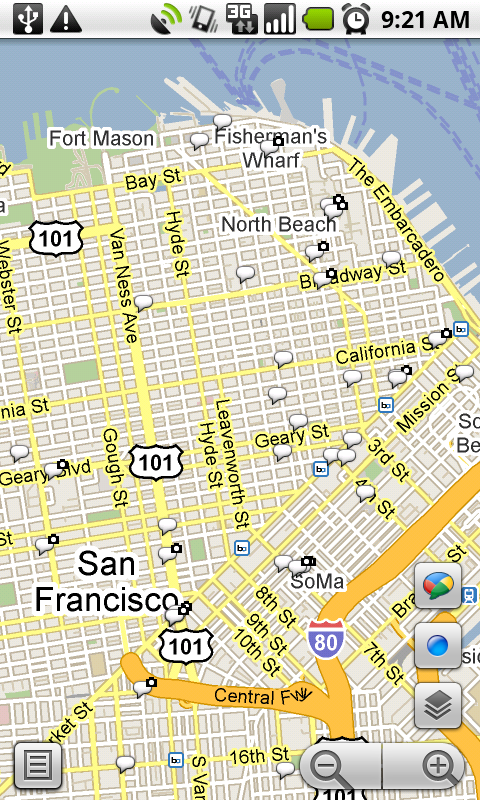
Are you curious if there’s anything interesting going on nearby? Enable the Buzz layer in Google Maps, then select any icon from the map or open the list view to see all the posts from the map area you’re viewing. We’ve found patients chatting from different hospital rooms, neighbors discussing a power outage, and even some public flirting. Here are a few more awesome examples we’ve stumbled upon:
  • A father hearing his baby’s first heartbeats at the hospital
  • Status updates of a rooftop fire being put out in San Francisco
  • Shooting of the TV show “Trauma” on location
  • Photos of the stadiums being built for the World Cup in South Africa
Ask questions and get answers
If you’re exploring a new area and looking for tips, post a question, and someone browsing Buzz in the area may be able to provide a quick answer. A few weeks ago on President’s Day, I was hanging out in the Russian Hill neighborhood of San Francisco. Rather than take my chances, I posted a question asking what the parking rules were. A friendly local soon informed me that I’d be free of parking stress -- meters were enforced but permit parking was not.

Share a picture worth a thousand words
Even if you could type 100 words a minute from your phone, sometimes a picture tells a different story than words could ever describe. Google Maps for mobile or the Android Buzz widget lets anyone share a picture of their favorite dish or the funny street sign they’ve found. Just attach a photo to your post or take a new one before posting. We’ve found great cases of citizen photo journalism on the public Google Buzz layer, such as traffic accidents blocking roads and location-tagged Picasa Web Albums showing the earthquake recovery in Haiti.

Give tips or learn about places
Google Buzz posts you create in Maps will always include your location (i.e. “My Location”) by default, but you can easily change the approximate location to a specific place, such as a restaurant. For example, change the post’s location and select the restaurant from the suggestions list before posting to give a recommendation or tip. Alternatively, you can search for the restaurant in Maps and select the Google Buzz option from the search results page (the post’s location will automatically be the restaurant). Now, people reading your post will know that your recommendation is about that exact restaurant, and your recommendation will be available for anyone browsing that restaurant’s search results page.

...and one reminder
Because we built Google Buzz in Maps for mobile to let you share information about places with the world, posts from Maps are always public to the web and include a location, either your approximate one or a specific place you choose.

To get started, install the latest version of Google Maps 4.0+ on your Android 1.6+, Windows Mobile, or Symbian S60 phone (BlackBerry coming soon; see availability details) by visiting m.google.com/maps on your phone and going to Layers > Buzz from the Maps main menu. From Android, iPhone, and iPod touch devices, you can also use the buzz.google.com Nearby view and map just like the Maps layer.

Visit our Help Center to learn more or tell us your feedback and questions in our Help Forum. Give us suggestions and vote on other people’s on the Mobile Product Ideas page!

Posted by Chris Nguyen, Product Marketing, Google Mobile Team
Email ThisBlogThis!Share to XShare to FacebookShare to Pinterest
Posted in Buzz, buzz for mobile, google maps, google maps for mobile | No comments
Newer Post Older Post Home

0 comments:

Post a Comment

Subscribe to: Post Comments (Atom)

Popular Posts

  • Happy New Year!
    Posted by Lawrence Chang, Product Marketing Manager, Google mobile team When I first asked the mobile team to send me pictures of how they r...
  • XMAS TIME - Get a Lumia 925 for free
    Do you want a Lumia 925 for Christmas? Thanks to DVLUP you can get it easy :) Check the new xmas challenge ! You just need to create 3 new ...
  • On Mobile and Elections
    It's election day! Once you've found  where to vote  and made your voice count, you'll probably want to see how the rest of the ...
  • Windows Phone 8 - Map and Clusters
    This code example demonstrates how to dynamically group pushpins in the map control. There is a lot of code for Windows Phone 7, then I merg...
  • Our 5 favourite new Windows Phone apps of the week
    Today myMoneyBook is featured in Nokia's blog:  Our 5 favourite new Windows Phone apps of the week . Thank you so much  Nokia !
  • Search Gmail & Docs with Google Mobile App on BlackBerry
    In January we updated Google Mobile App for BlackBerry so it can search your on-device email and contacts . Today we’re pleased to announce...
  • orkut for S60, now with photo uploads and picture galleries
    When we launched the mobile (xhtml) version of orkut back in April on m.orkut.com, we were overwhelmed by its adoption. However, Google alw...
  • Our newest Mobile Search feature: Where am I?
    Many of our improvements to search quality come from analyzing actual search queries. We’re constantly trying to surface more relevant sea...
  • YouTube Mobile Gets a Kick Start
    (Cross-posted with the YouTube Blog ) It’s well known that the mobile internet is huge and growing fast; what’s surprising is exactly how fa...
  • Coding4Fun - ThemedImageConverter
    When you publish an application, you need to meet the requirement 5.5.2 from Dev Center: "App content, such as text and visual element...

Categories

  • 100th post
  • 3D
  • 6210 navigator
  • 6220 classic
  • adsense
  • adsense for mobile
  • alexandra's mobile [ad]itude
  • Amber
  • android
  • android market
  • android widget
  • app
  • appdeals
  • apphub
  • apple
  • apps
  • att
  • autocomplete
  • best buy mobile
  • better know your mobile
  • biking directions
  • BlackBerry
  • BlackBerry Storm
  • blackjack
  • blogger
  • brightpoint
  • bug
  • buxfer
  • Buzz
  • buzz for mobile
  • c#
  • cab4me
  • Calendar
  • Caliburn
  • canada
  • CES
  • check-in
  • chi-2008
  • clearwire
  • cloud print
  • Clusters
  • Coding4fun
  • Contacts
  • convenience key
  • countdown to 2009
  • coupons
  • csharp
  • culture
  • dennis woodside
  • developers
  • Docs
  • Doodle
  • doodles
  • dotorg
  • doubleclick mobile
  • droid
  • DVLUP
  • e-series
  • ebook
  • election
  • enterprise
  • feature phones
  • france
  • free
  • g1
  • geo
  • geolocation api
  • germany
  • Gesture search
  • gmail
  • gmail for android
  • gmail for mobile
  • GOOG-411
  • googe search
  • Google
  • Google Africa
  • google analytics
  • Google Apps
  • Google Apps Blog
  • google apps device policy
  • google apps for mobile
  • google book search
  • google buzz
  • google buzz for mobile
  • Google Custom Search
  • google docs
  • google earth
  • google finance
  • google gears for mobile
  • google goggles
  • Google I/O
  • google instant
  • google latitude
  • google local search
  • Google Location Alerts
  • google location history
  • Google Locaton History
  • google maps
  • google maps for mobile
  • google maps navigation
  • google mobile
  • google mobile ads
  • google mobile help
  • google mobile help forum
  • Google Mobile Search
  • google mobile tips
  • google mobile tricks
  • google moderator
  • Google News
  • google offers
  • google product search
  • Google profile
  • Google public location badge
  • google search
  • google search app
  • google search by voice
  • google search for mobile
  • google shopper
  • google sites
  • google sky map
  • Google SMS
  • google suggest
  • google sync
  • google talk
  • google toolbar
  • google translate
  • google translate for animals
  • google voice
  • google wallet
  • google+
  • googlenew
  • gps
  • hangouts
  • history
  • honeycomb
  • hot
  • hotpot
  • html 5
  • i-mode
  • igoogle
  • image ads
  • image search
  • inside search
  • Interative web app
  • iOS
  • ipad
  • iphone
  • ipod touch
  • italy
  • iterative web app
  • Iterative Webapp
  • J2ME
  • jason spero
  • lambda
  • latitude api
  • layers
  • Listen
  • Local Business Center
  • local inventory
  • local search
  • locale
  • location based search
  • location tag
  • Lumia 1020
  • Lumia 925
  • mac
  • macworld
  • Mail
  • Maps
  • marketplace
  • mary meeker
  • meow me now
  • microsoft
  • mobile
  • mobile [ad]itude
  • mobile advertising
  • mobile calendar
  • mobile tricks
  • mobile world congress
  • mobile.google.com
  • moneybook
  • motorola
  • movies
  • music
  • MVVM
  • my location
  • my tracks
  • myBattery
  • mymoneybook
  • n-series
  • n78
  • n95
  • n96
  • navigation
  • new york city
  • nexus
  • nfc
  • nokia
  • Nokia Pro Camera
  • NowPlaying
  • ntt docomo
  • NuGet; Visual Studio
  • nyc
  • open handset alliance
  • opera
  • opera mini
  • opera mobile
  • orkut
  • outbox
  • palm
  • palm webos
  • Panoramio
  • personalized suggest
  • Picasa web albums
  • Place Pages for mobile
  • Places
  • Places Directory
  • pre
  • product ideas
  • product search
  • produt search for mobile
  • quick search box
  • Reader
  • registration
  • research
  • s60
  • samsung
  • santa
  • search
  • search by voice
  • Search Options
  • sharing
  • shortcut
  • sidekey
  • silverlight
  • sky lab
  • smart navigation
  • social
  • Sony
  • sony ericsson
  • spain
  • Spreadsheeets
  • sprint
  • sql ce
  • sqlite
  • starring
  • stars
  • street view
  • Summer Games
  • symbian
  • Sync
  • Syncfusion
  • t-mobile
  • tablet
  • tasks
  • TechNet
  • TechNet wiki
  • telerik
  • Thomson
  • TileView
  • tips
  • transit
  • uiq
  • uk
  • universal search
  • verizon
  • visual search
  • voice actions
  • voice search
  • vote
  • walking directions
  • walking navigation
  • web app
  • wep app
  • wikininjas
  • windows 8
  • windows mobile
  • windows phone
  • Windows Phone 7.8
  • Windows phone 8
  • windows RT
  • Windows Store
  • wireless week
  • xaml
  • xna
  • youtube
  • youtube channel
  • YouTube for mobile
  • zoho

Blog Archive

  • ►  2013 (21)
    • ►  November (3)
    • ►  October (1)
    • ►  September (3)
    • ►  August (3)
    • ►  July (2)
    • ►  June (4)
    • ►  April (1)
    • ►  March (1)
    • ►  February (2)
    • ►  January (1)
  • ►  2012 (32)
    • ►  December (2)
    • ►  November (3)
    • ►  October (3)
    • ►  September (6)
    • ►  August (1)
    • ►  June (1)
    • ►  May (2)
    • ►  April (3)
    • ►  March (5)
    • ►  February (5)
    • ►  January (1)
  • ►  2011 (98)
    • ►  December (8)
    • ►  November (9)
    • ►  October (6)
    • ►  September (7)
    • ►  August (2)
    • ►  July (12)
    • ►  June (7)
    • ►  May (11)
    • ►  April (8)
    • ►  March (12)
    • ►  February (9)
    • ►  January (7)
  • ▼  2010 (122)
    • ►  December (18)
    • ►  November (10)
    • ►  October (8)
    • ►  September (10)
    • ►  August (10)
    • ►  July (4)
    • ►  June (11)
    • ►  May (7)
    • ►  April (14)
    • ▼  March (13)
      • Stars in mobile search
      • Tips for exploring the Buzz layer in Google Maps f...
      • Google Mobile App now available for BlackBerry Storm
      • Introducing Google Buzz widget for Android
      • Orkut for Android — live folders, photo upload and...
      • Google Maps for Android: Search ‘n Swipe, Latitude...
      • Gesture Search now available for Android 1.6
      • 5 more tips for using Google Buzz on your phone
      • In stock nearby? Look for the blue dots.
      • ​New YouTube App for Windows Mobile and Nokia S60 ...
      • Search your Android phone with written gestures
      • 5 tips for using Google Buzz on your phone
      • Click-to-Call Phone Numbers in Mobile Ads for Nati...
    • ►  February (10)
    • ►  January (7)
  • ►  2009 (109)
    • ►  December (7)
    • ►  November (14)
    • ►  October (14)
    • ►  September (6)
    • ►  August (7)
    • ►  July (9)
    • ►  June (13)
    • ►  May (10)
    • ►  April (7)
    • ►  March (7)
    • ►  February (11)
    • ►  January (4)
  • ►  2008 (92)
    • ►  December (11)
    • ►  November (7)
    • ►  October (9)
    • ►  September (6)
    • ►  August (6)
    • ►  July (11)
    • ►  June (12)
    • ►  May (4)
    • ►  April (8)
    • ►  March (5)
    • ►  February (5)
    • ►  January (8)
  • ►  2007 (9)
    • ►  December (6)
    • ►  November (3)
Powered by Blogger.

About Me

Unknown
View my complete profile